When I model custom wheels for games like Assetto Corsa, BeamNG, and GTA V, starting every rim from a primitive cylinder eats up hours of tedious work. Matching true automotive geometry—like offset (ET), PCD bolt patterns, center bores, and actual bead seat diameters—requires manual calculations that slow down the entire hard-surface workflow.
To fix this, I developed Wheel Tools Pro, a dedicated Blender plugin (compatible with Blender 4.3+) that automates real-world wheel barrel generation, PCD alignment, and radial spoke arrays directly inside the 3D Viewport.
Here is how I built it, how it accounts for true wheel industry dimensions, and how you can use it to build game-ready wheels faster.
The Fitment Problem: Nominal Bead Seat vs. Lip-to-Lip Sizing
If you scale a 3D wheel cylinder to exactly 18 inches in Blender based on outer edge vertices, your wheel is actually undersized.
In real-world wheel manufacturing:
- An 18-inch wheel measures 18 inches at the bead seat (where the tire bead sits inside the rim).
- The outer flange lip adds approximately 0.42 to 0.5 inches of additional radius depending on the lip style.
If you don't account for this in 3D modeling, your tire meshes won't seat cleanly, and the wheel fitment inside game engines will look thin or out of scale.
I wrote Wheel Tools Pro to do the math automatically:
- Input 18.00" for Nominal Diameter, and the script builds the inner bead seat at exactly 18 inches while extending the outer flange to proper J-flange proportions.
- Input 8.50" for Width, and it measures the distance between inner flanges—not total exterior depth.
Key Features of Wheel Tools Pro
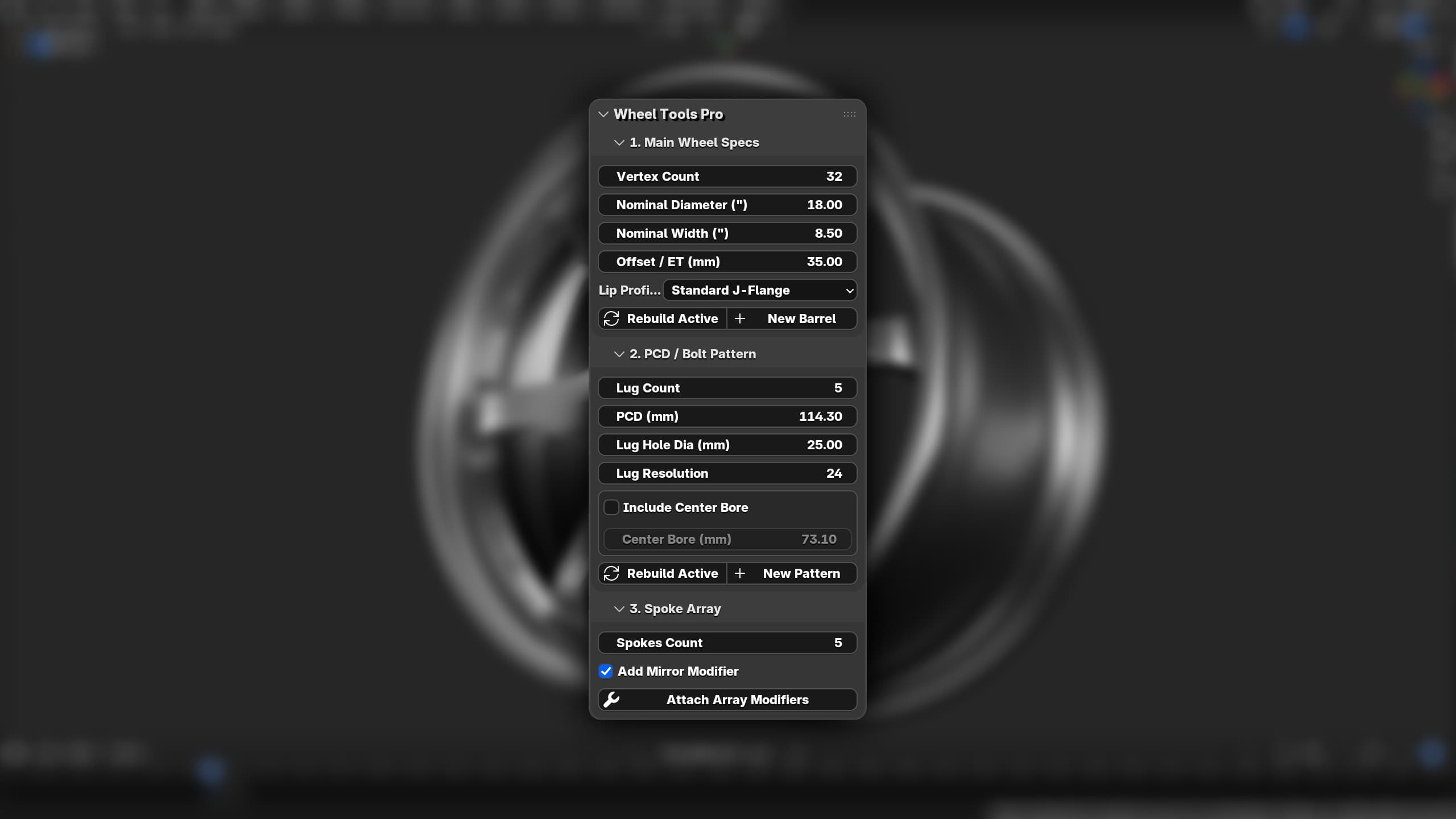
I structured the tool into three distinct workflow panels in the N-Sidebar (3D Viewport > Sidebar > Wheel Tools):
1. Parametric Main Wheel Specs & Lip Styles
Instead of extruding edges by hand, you can configure your base mesh dimensions in real-time:
- Nominal Diameter & Width (Inches): Uses exact conversion factors (
0.0254m) to build true-to-life proportions. - Offset / ET (mm): Positive offset shifts the hub mounting pad inward along the Y-axis.
- 4 Automotive Lip Profiles:
- Standard J-Flange: Full factory rim profile with curved lip returns.
- Reverse / Flat Lip: Smooth rolled flange profile with rear-loading drop center (ideal for deep-dish 3-piece wheels).
- Step Lip: Stepped outer barrel reducing the face diameter by ~1 inch for classic tuner and period-correct mesh wheels.
- Flat / No Lip: Clean setup barrel for custom multi-piece face fitting.
2. Precise PCD / Bolt Pattern Generator
Calculating 5-lug or 4-lug spacing with manual rotation angles is time-consuming. The PCD tool builds top-centered (+Z) bolt patterns in millimeters:
- Custom Lug Count (3 to 8 lugs).
- Standard PCD (mm) input (e.g.,
100.0,114.3,120.0,130.0). - Configurable Lug Hole Diameter and Vertex Resolution.
- Optional Center Bore toggle with precise hub bore sizes (e.g.,
73.1mmor66.6mm).
3. Automated Spoke Array System
Once your barrel and PCD are generated, modeling custom spoke geometry is as simple as working on a single spoke branch:
- Set your target Spokes Count.
- Click Attach Array Modifiers to automatically deploy an empty object driver set to the exact rotational division ($360^\circ / N$).
- Includes an optional X-Axis Mirror Modifier to keep spoke symmetry locked while you model.
Photomatching Wheel Reference Photos
If you are modeling a specific real-world wheel face and need to align your reference images perfectly with the generated barrel, check out my video guide on How to Photomatch Wheels in Blender. Combining photomatching camera alignment with true PCD geometry makes recreations spot-on to real-life counterparts.
Step-by-Step: Modeling a Custom 5-Lug Wheel in 5 Minutes
- Build the Barrel: Open the
Wheel Toolssidebar panel. Select18.00Nominal Diameter,9.50Nominal Width,-15.00ET offset for a deep dish profile, and chooseStep Lip. Click New Barrel. - Generate the Hub: Go to
PCD / Bolt Pattern, set Lug Count to5, PCD to114.3, enable Center Bore at73.1mm, and click New Pattern. - Model One Spoke: Create a single spoke profile mesh between the hub bore edge and the inner barrel step edge.
- Array the Face: Select your spoke object, set Spokes Count to
5in section 3, and hit Attach Array Modifiers.
You now have a perfectly dimensioned, parametric wheel base ready for high-poly subdivision or low-poly game optimization.
Download Wheel Tools Pro & Explore Custom Assets
I built this tool to speed up my own asset production, and I'm making it available for other 3D automotive artists and modders.
If you're looking for pre-built, production-ready wheel models for your game projects rather than modeling from scratch, check out my shop with a selection of photomatched, game-ready 3d wheels here